Why Conn3x is one tool
Ask anyone who runs Linux servers how a new one comes to life, and you’ll hear the same two names. Terraform, or OpenTofu, makes the machine. Ansible sets it up. Both do their half well.
The trouble lives between them.
Somewhere there’s a script that copies addresses from one tool into a file the other one reads. There’s a sleep 60 that somebody added because the playbook kept knocking before SSH was listening. There are two records of what’s out there, and on a bad day they disagree. None of that is anyone’s fault. It’s what happens when one job gets split across two tools.
Our position is simple. We’ll take one tool over two, every time, as long as it gets the job right every time. That’s the tool we’re building with Conn3x.
Where the hand-off hurts
If you’ve wired these two together, you’ve met most of these.
The race at boot. The cloud API says the server exists. SSH doesn’t agree yet. So the pipeline grows a retry loop or a sleep, tuned by hand until it mostly works.
The glue. Addresses travel through local-exec, an inventory script or a dynamic inventory plugin. It’s code nobody wanted to write, and it’s the first thing to break when a provider renames an attribute.
Two states, two previews. Terraform keeps state for the cloud. Ansible keeps none for the hosts, so the closest thing to a plan for them is a separate --check --diff run. You read two outputs and trust that they describe the same change.
The scale-down. Shrink a pool from three servers to two and Terraform removes a machine. Whatever else knew about it, an inventory file or a group in a playbook, keeps pointing at an address that’s gone until somebody notices.
Servers and setup in one file
Conn3x is built on OpenTofu, so your providers, modules and state work as they always have. What it adds is the circuit: a playbook, written in HCL, that lives in the same configuration as the servers it sets up.
Here’s a pool of three Rocky Linux servers, each with a deploy account and its key. The pool is a set of names, and everything else follows from it.
locals {
  servers = toset(["app-1", "app-2", "app-3"])
}

# Each server's SSH host key, made here and installed by cloud-init,
# so Conn3x can check it on the very first connection.
resource "tls_private_key" "host" {
  for_each  = local.servers
  algorithm = "ED25519"
}

resource "digitalocean_droplet" "app" {
  for_each = local.servers
  name     = each.key
  image    = "rockylinux-10-x64"
  region   = "nyc3"
  size     = "s-1vcpu-1gb"
  ssh_keys = [var.ssh_key_id]

  user_data = "#cloud-config\n${yamlencode({
    ssh_deletekeys = true
    ssh_keys = {
      ed25519_private = tls_private_key.host[each.key].private_key_openssh
      ed25519_public  = tls_private_key.host[each.key].public_key_openssh
    }
  })}"
}

circuit "app" {
  hosts = {
    for name, d in digitalocean_droplet.app : name => {
      address  = d.ipv4_address
      host_key = tls_private_key.host[name].public_key_openssh
    }
  }

  ssh {
    user             = "root"
    private_key_file = "~/.ssh/id_ed25519"
  }

  step "deploy_user" {
    user {
      name  = "deploy"
      shell = "/bin/bash"
    }
  }

  step "deploy_key" {
    authorized_key {
      user = "deploy"
      key  = file("${path.module}/deploy.pub")
    }
  }
}
Read it top to bottom and the hand-offs are gone. The addresses reach the circuit as an expression, so there’s no inventory file. Each server’s host key is made in the same configuration, so even the first SSH connection is checked, never trusted. And the ssh block’s timeout, three minutes unless you change it, covers a server that’s still booting.
conn3x plan lists all twelve changes together: the host keys, the droplets, and the account and key headed for each server. conn3x apply works through them in dependency order and records the lot in a single state file.
Now take app-3 out of the set. The next plan destroys that droplet, and first it deletes the deploy key from the server, because keys default to on_remove = "delete". The account is forgotten rather than removed, which is the default for most steps. Either way, nothing is left pointing at a server that’s gone.
What one tool changes
It’s easier, and the reasons are boring in the best way. There’s one binary to install, one language to read and one command to run. A new teammate learns HCL and a short list of modules, and they can follow the whole path from API call to running service.
It’s also better, because one tool can see the whole picture. A plan is a diff against what’s on the servers right now, line by line for files, next to the cloud changes that cause it. conn3x drift checks both layers and exits 2 when something changed by hand, so a scheduled job hears about a hand edit the morning after, not the next time someone applies. And the servers need nothing extra. Conn3x reaches them over plain SSH, with no agent to install and no Python to keep in step.
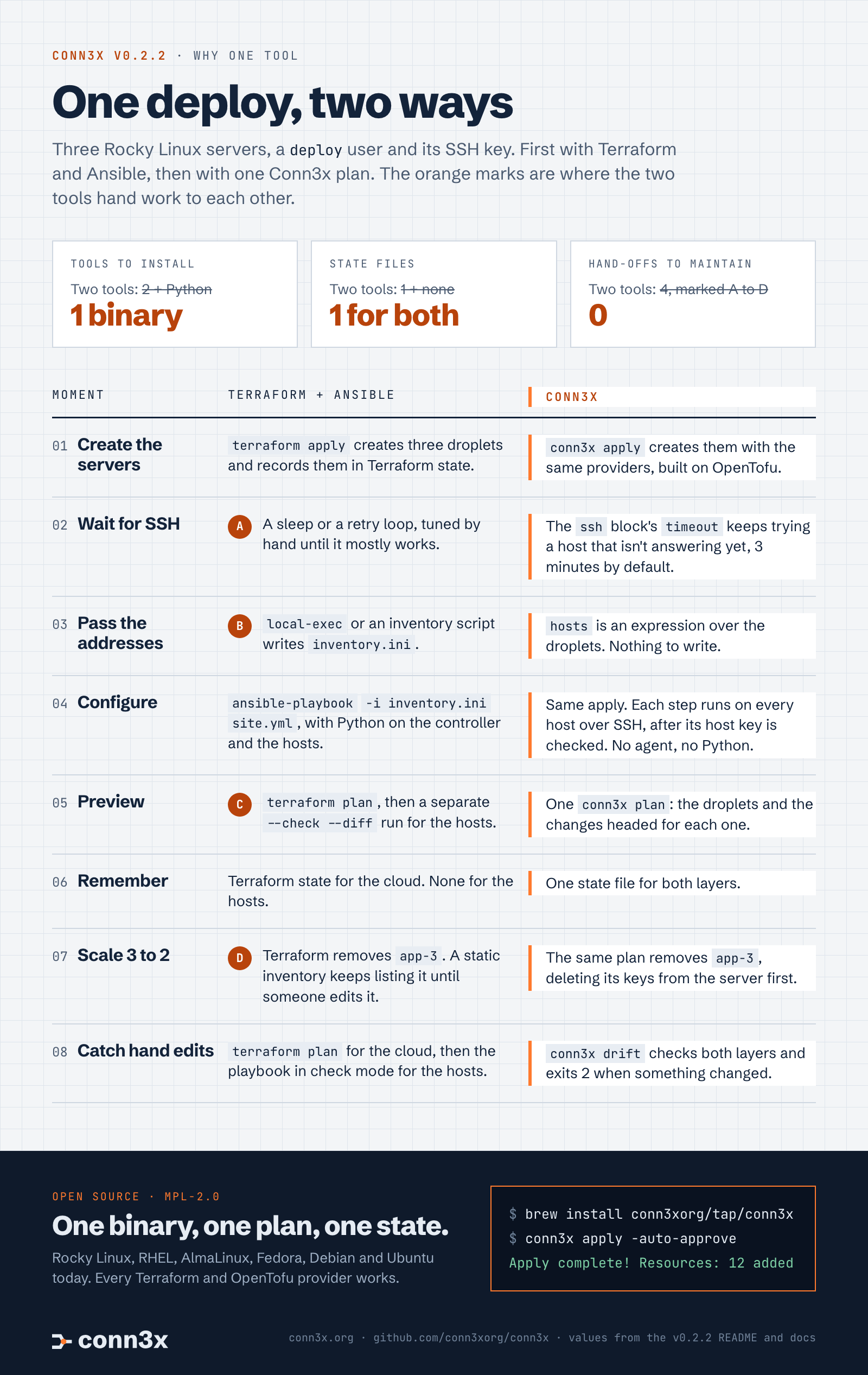
Read the infographic as text
- The setup: three Rocky Linux servers, a
deployuser and its SSH key, done with Terraform and Ansible and then with one Conn3x plan. - Tools to install: two tools plus Python, or one binary.
- State files: Terraform state plus none for the hosts, or one for both.
- Hand-offs to maintain: four, or none.
- Create the servers:
terraform apply, orconn3x applywith the same providers. - Wait for SSH (hand-off A): a sleep or retry loop tuned by hand, or the
sshblock’stimeout, three minutes by default. - Pass the addresses (hand-off B):
local-execor an inventory script writesinventory.ini, orhostsis an expression over the droplets. - Configure:
ansible-playbook -i inventory.ini site.ymlwith Python on both sides, or the same apply over SSH with host keys checked and no agent. - Preview (hand-off C):
terraform planplus a separate--check --diffrun, or oneconn3x plan. - Remember: Terraform state for the cloud and none for the hosts, or one state file.
- Scale 3 to 2 (hand-off D): a static inventory keeps listing the removed server, or the same plan removes its steps, deleting keys from the server first.
- Catch hand edits:
terraform planfor the cloud plus the playbook in check mode for the hosts, orconn3x drift, which exits 2 when something changed.
If you live in Ansible
You already think in tasks, handlers and hosts, and circuits keep those ideas: steps run in order, handlers fire on change, and each.key is the host. You don’t have to start from a blank page, either. conn3x convert ansible -i inventory.ini -out site.tf site.yml converts the tasks it’s sure about. Anything it can’t vouch for stays in the output as a comment that says why, so you finish it knowingly.
If you live in Terraform
You keep your providers, your modules and your state. Circuits sit next to the resources you already have, and the plan you know grows a section for what’s about to change on the servers. The configuration layer you used to hand off to another tool becomes part of the same review.
If you’re choosing your first stack
Learn one thing. Conn3x configures Rocky Linux, RHEL, AlmaLinux, Fedora, Debian and Ubuntu today, and every Terraform and OpenTofu provider works, so what you learn carries over in both directions.
Built in the open
Conn3x starts from OpenTofu and tracks its releases, and we’re grateful to the OpenTofu and Terraform communities whose work makes provider compatibility possible. It’s MPL-2.0, contributions need a DCO sign-off, and there’s no CLA. Each change is tested end to end on four distributions before it merges, and every release is signed, with an SBOM and build provenance you can check yourself.
It’s early, and the v0.1 and v0.2.2 notes say exactly what’s there.
Try it
brew install conn3xorg/tap/conn3x
Or download a release for Linux. Get started takes about fifteen minutes. If Conn3x saves you a script, star the repo so the next person finds it, and tell us what you’d want next in Discussions.