AI you can account for
Sooner or later someone asks where the prompts go, who can use which model, and what changed last Tuesday. Here's how a handful of Conn3x circuits and a plan file help you answer, and where they stop.
Sooner or later, somebody asks. It might be a customer’s security questionnaire, or your own auditor, or the person who signs the OpenAI invoice and wants to know why it doubled. Where do the prompts go? Who’s allowed to use which model? What did someone paste into it last month, and what did that cost?
“We use AI responsibly” doesn’t answer any of those. A config file you can show them does.
That’s what this series is about. Over the next five weeks we’ll take one piece of a private AI stack at a time, each one a Conn3x circuit you can apply today, and look at which question it answers, what we tested, and what it leaves to you. This post is the map.
The three documents people name
When AI governance comes up, three names come up with it.
The NIST AI Risk Management Framework is voluntary guidance from the US National Institute of Standards and Technology, built around four functions: Govern, Map, Measure and Manage. ISO/IEC 42001 is the international standard for an AI management system, and it’s the one organisations get certified against. The EU AI Act is law, Regulation (EU) 2024/1689, and what it asks of you depends on what your system does and whether you build it or put it to use.
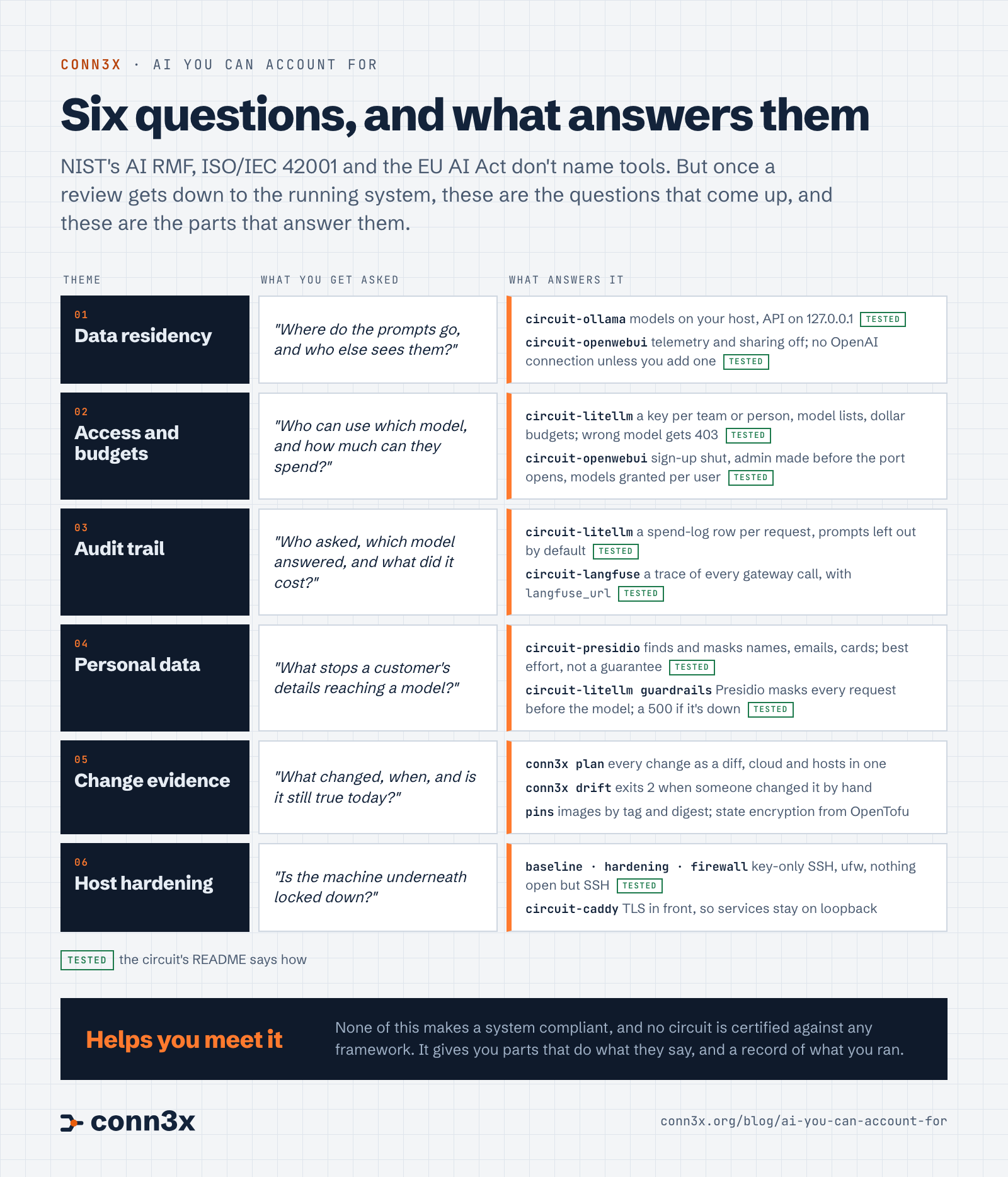
None of them tells you to install anything. They’re about risk, roles, policies and people, and most of the work they describe happens in documents and meetings, not on servers. But a review always reaches the running system eventually. And when it does, in our reading, the questions get concrete, and they come down to the same six whichever document started the conversation.
Read the map as text
- Data residency. “Where do the prompts go, and who else sees them?” circuit-ollama runs models on your host with its API on
127.0.0.1. circuit-openwebui turns off telemetry and sharing, and has no OpenAI connection unless you add one. - Access and budgets. “Who can use which model, and how much can they spend?” circuit-litellm gives each team or person a key, a list of models and a budget in dollars; asking for a model outside the list gets a
403. circuit-openwebui keeps sign-up shut and shows users only the models an admin gives them. - Audit trail. “Who asked, which model answered, and what did it cost?” circuit-litellm writes a spend-log row for every request, with the prompt left out by default, and with
langfuse_urlit sends a trace of every call to circuit-langfuse on your own host. - Personal data. “What stops a customer’s details reaching a model?” circuit-presidio finds and masks names, emails and card numbers, on a best-effort basis. Set as a guardrail in circuit-litellm, it masks every request through the gateway before the model sees it.
- Change evidence. “What changed, when, and is it still true today?”
conn3x planshows every change as a diff,conn3x driftexits 2 when someone changed something by hand, images are pinned by tag and digest, and OpenTofu’s state encryption works as it does there. - Host hardening. “Is the machine underneath locked down?” circuit-baseline, circuit-hardening and circuit-firewall leave key-only SSH and nothing else open. circuit-caddy puts TLS in front, so the services stay on loopback.
Six questions, one at a time
Where do the prompts go? With circuit-ollama, nowhere: the model runs on your host, and its API listens on 127.0.0.1. circuit-openwebui goes further than you’d guess. When you don’t give it an OpenAI-compatible address, it turns that connection off rather than leave Open WebUI’s default of api.openai.com in place, and it switches off the telemetry, the update check and sharing to the community site. Data residency was GDPR’s business long before it was AI’s, and the answer hasn’t changed: know where the bytes go.
Who can use what? circuit-litellm puts one gateway in front of every model, local or hosted. Each team gets its own key, its own model list and a budget in US dollars. In testing, a key made for one model got a 403 for the other, and a request for a budget over the limit got a 400. Provider keys stay on the host, so when someone leaves, you delete their key instead of rotating the real one.
Who asked, and what did it cost? LiteLLM writes a row for every request: which key and team, which model, when, how many tokens, what it cost, and whether it worked. Refused requests are logged too. What it leaves out, by default, is the conversation. That’s a choice you can flip, and next week’s post is about making it on purpose. For more than a row, circuit-langfuse runs Langfuse on your own host, and one input in circuit-litellm sends it a trace of every call through the gateway: model, tokens, cost and timing, and the masked prompt too if you choose to keep it.
What stops personal data reaching the model? circuit-presidio runs Presidio, the open-source PII detector first built at Microsoft, as two small services on loopback. It finds names, email addresses, phone numbers and card numbers and swaps them for placeholders. It’s best effort, and its maintainers say so before we do. Since circuit-litellm v0.2.0 it can sit inside the gateway as a guardrail: in testing, a prompt with a name and an email address arrived upstream as My name is <PERSON> and my email is <EMAIL_ADDRESS>, and with Presidio stopped, LiteLLM refused the request with a 500 rather than send it unmasked.
What changed, and is it still true? This one’s Conn3x itself. Every change goes through conn3x plan first, so bumping LiteLLM to a new release shows up as a new image digest in a unit file, in a diff someone can review. conn3x drift reads every host again on a schedule and exits 2 when something was changed by hand. And the secrets stay out of the record: provider keys, database passwords and admin passwords reach the hosts through ephemeral inputs and never touch your plan, your state or your CI logs. For the rest of the state, OpenTofu’s state encryption works in Conn3x as it does there.
Is the box itself locked down? circuit-baseline, circuit-hardening and circuit-firewall did exactly that in the private AI box: key-only SSH, a tighter kernel, ufw, and nothing answering from outside but SSH. Every service in this stack listens on 127.0.0.1 by default, so circuit-caddy with a certificate is the only door you add.
How the pieces fit
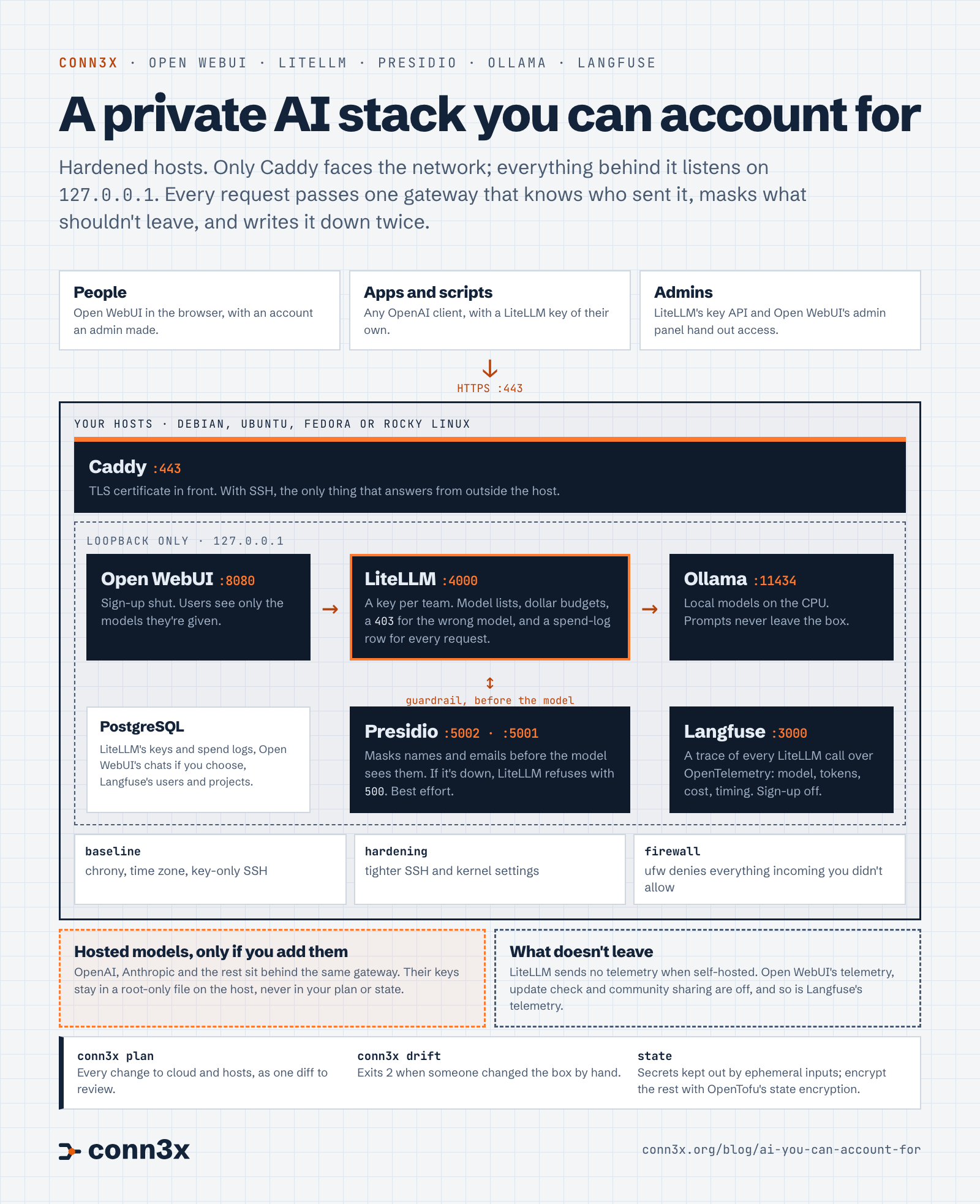
Put together, it looks like this. One door, one gateway every request goes through, and a record of what happened.
Read the diagram as text
- Who comes in: people through Open WebUI in a browser, apps and scripts with a LiteLLM key of their own, and admins handing out access through LiteLLM’s key API and Open WebUI’s admin panel. All of it over HTTPS on port 443.
- The hosts: Debian, Ubuntu, Fedora or Rocky Linux. Caddy holds the certificate and, with SSH, is the only thing that answers from outside.
- On loopback only: Open WebUI on
:8080talks to LiteLLM on:4000, which talks to Ollama on:11434. LiteLLM checks the key, the model list and the budget, and writes a spend-log row for every request. PostgreSQL keeps LiteLLM’s keys and spend logs, Open WebUI’s chats if you choose, and Langfuse’s users and projects. - Guardrail: LiteLLM sends every request to Presidio on
:5002and:5001first, and the model gets the masked text. If Presidio is down, the request fails with a500. - Tracing: LiteLLM sends a trace of every call to Langfuse on
:3000over OpenTelemetry, and your apps can send their own. Sign-up is off. - Underneath: circuit-baseline, circuit-hardening and circuit-firewall.
- Leaving the box: only prompts to hosted models you add yourself, through the same gateway. Their keys stay in a root-only file on the host. LiteLLM sends no telemetry when self-hosted. Open WebUI’s telemetry, update check and community sharing are off, and so is Langfuse’s telemetry.
- Around all of it:
conn3x planfor every change,conn3x driftfor hand edits, and state encryption for what’s in state.
You don’t need all of it on day one. Most people start with the gateway, because it answers three of the six questions by itself.
Try the first piece
With circuit-litellm applied, this is how a team gets access. On the host, read the master key from its file and create a team, limited to the models it may use and with a budget of its own:
mk=$(sudo sed -n 's/^LITELLM_MASTER_KEY=//p' /etc/litellm/keys.env)

curl -s http://127.0.0.1:4000/team/new \
  -H "Authorization: Bearer $mk" -H 'Content-Type: application/json' \
  -d '{"team_alias": "research", "models": ["claude-sonnet"], "max_budget": 50}'
The answer carries a team_id. Then make a key for someone on that team:
curl -s http://127.0.0.1:4000/key/generate \
  -H "Authorization: Bearer $mk" -H 'Content-Type: application/json' \
  -d '{"team_id": "TEAM_ID", "key_alias": "alice-laptop"}'
That’s two of the six questions answered in two commands: the research team can use one model and spend $50, and every request Alice makes lands in the spend logs with her key’s name on it. The README has the whole setup, PostgreSQL included.
What it doesn’t do
It doesn’t make you compliant. No circuit is certified against NIST’s framework, ISO/IEC 42001 or the EU AI Act. Those are about organisations and the systems they run, not components, and most of what they ask for is policy, people and paperwork. What Conn3x gives you is parts that do what their READMEs say, and a plan, a state file and a drift report that show what you ran. That helps you meet a requirement. Whether you’ve met it is for you and your assessor.
It doesn’t decide which rules apply to you. That depends on what your system does, where your users are and what role you play, and it’s a question for someone who reads regulations for a living.
And it doesn’t promise more than was tested. The Presidio guardrail was tested masking what goes to the model; checking the model’s answers too (post_call), or putting the original values back into them (output_parse_pii), hasn’t been tested. And Presidio is best effort however it’s wired in.
The rest of the series
One post a week, each on one piece: the gateway with its keys and budgets, private chat with Open WebUI and Ollama, scrubbing personal data with Presidio, a box for your coding agents, and an audit trail with Langfuse. They’ll appear in the list below as they go live. If there’s a question an auditor asked you that isn’t on the map, tell us in a discussion. That’s how the next circuit gets picked.