One gateway for every model
Your OpenAI key is in four .env files and a Slack thread. circuit-litellm puts one gateway in front of every model, hosted or local, and hands out a key per team, with a model list, a budget and a log line for every request.
Count the places your OpenAI key lives. The production .env. A developer’s laptop or three. The CI secrets. That Slack thread from March where someone needed it “just for a minute”. When a person leaves, you rotate it and something breaks. And when the invoice doubles, nobody can tell you which of those places did it.
The fix is old and boring, which is why it works: put one gateway in front, give everyone their own key to the gateway, and keep the real keys in one place. LiteLLM Proxy is that gateway for language models, and circuit-litellm runs it on your own host.
This is the second post in a series on running AI you can account for. The gateway is where most people should start, because it answers three questions on its own: who can use which model, how much they can spend, and who asked what.
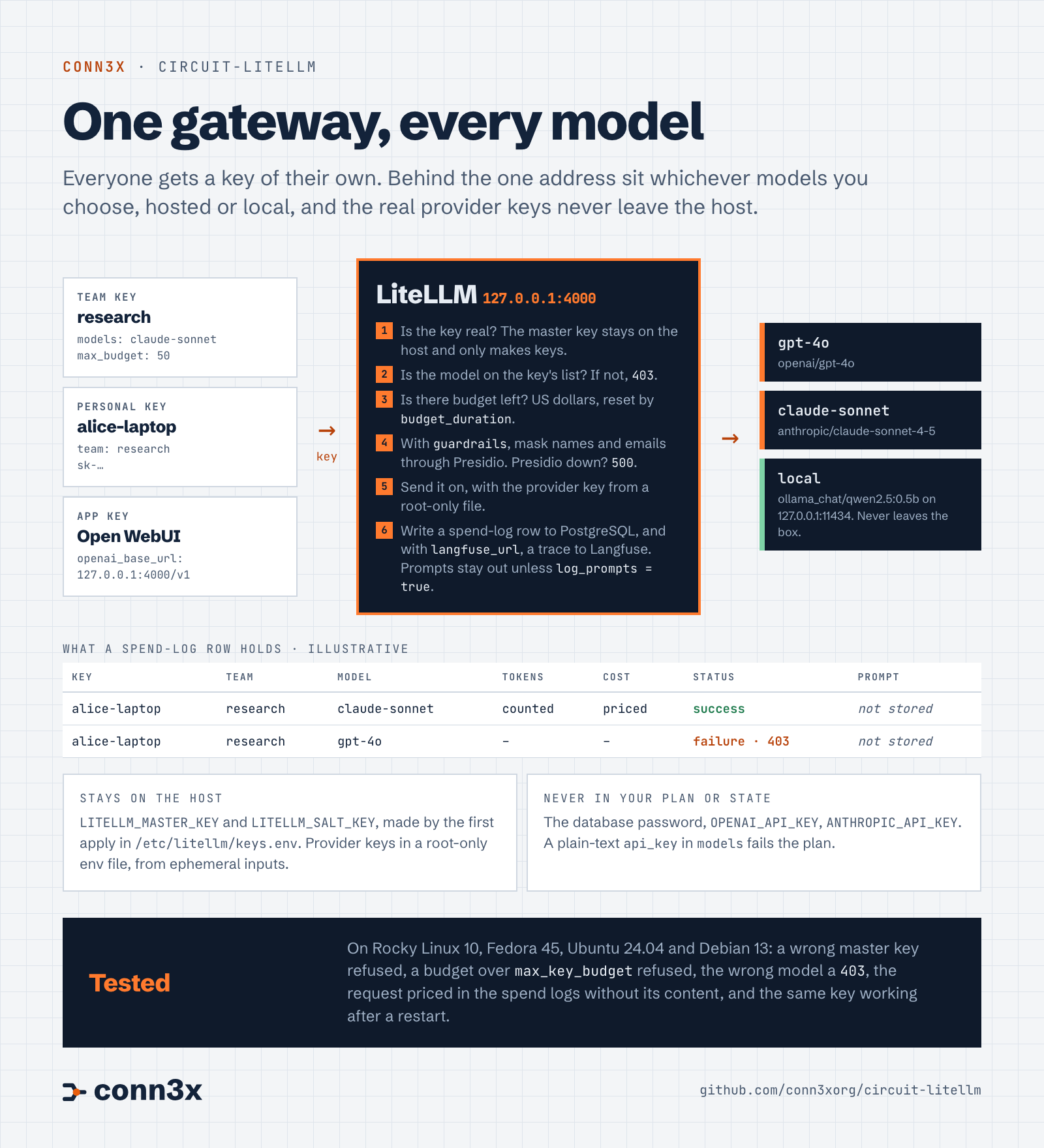
Read the diagram as text
- Keys in: a team key for
research, limited toclaude-sonnetwith a budget of 50; a personal key,alice-laptop, on that team; and a key for an app such as Open WebUI, which useshttp://127.0.0.1:4000/v1as its OpenAI base URL. - LiteLLM on
127.0.0.1:4000, in order: checks the key is real (the master key stays on the host and only makes keys), checks the model is on the key’s list and answers403if not, checks there’s budget left in US dollars, masks names and emails through Presidio whenguardrailsis set (and answers500if Presidio is down), sends the request on with the provider key from a root-only file, and writes a spend-log row to PostgreSQL and, withlangfuse_url, a trace to Langfuse, without the prompt unlesslog_prompts = true. - Models out:
gpt-4othrough OpenAI,claude-sonnetthrough Anthropic, andlocal,qwen2.5:0.5bin Ollama on127.0.0.1:11434, which never leaves the box. - Spend log: a successful
claude-sonnetrequest with tokens counted and priced, and agpt-4orequest logged as a failure with403. Neither stores the prompt. - Stays on the host:
LITELLM_MASTER_KEYandLITELLM_SALT_KEYin/etc/litellm/keys.env, and the provider keys in a root-only env file. - Never in your plan or state: the database password and the provider keys. A plain-text
api_keyinmodelsfails the plan.
What one apply gives you
LiteLLM runs from its official image, pinned by tag and digest, under Podman as a systemd service, and keeps its keys, teams, budgets and spend in PostgreSQL. Pair it with circuit-postgres and the whole thing fits on one host with 2 GB of memory, on Debian, Ubuntu, Fedora or Rocky Linux.
Here’s the README’s usage, with two hosted models behind it:
variable "db_password" {
  type      = string
  ephemeral = true
  sensitive = true
}

variable "openai_api_key" {
  type      = string
  ephemeral = true
  sensitive = true
}

variable "anthropic_api_key" {
  type      = string
  ephemeral = true
  sensitive = true
}

module "postgres" {
  source = "github.com/conn3xorg/circuit-postgres?ref=v0.2.0"

  hosts                = { gateway = "192.168.1.50" }
  ssh_private_key_file = "~/.ssh/id_ed25519"

  users          = ["litellm"]
  user_passwords = { litellm = var.db_password }
  databases      = { litellm = "litellm" }
}

module "litellm" {
  source = "github.com/conn3xorg/circuit-litellm?ref=v0.2.0"

  depends_on = [module.postgres]

  hosts                = { gateway = "192.168.1.50" }
  ssh_private_key_file = "~/.ssh/id_ed25519"

  db_connection_uri = "postgresql://litellm:${var.db_password}@127.0.0.1:5432/litellm"

  models = [
    {
      model_name     = "gpt-4o"
      litellm_params = { model = "openai/gpt-4o", api_key = "os.environ/OPENAI_API_KEY" }
    },
    {
      model_name     = "claude-sonnet"
      litellm_params = { model = "anthropic/claude-sonnet-4-5", api_key = "os.environ/ANTHROPIC_API_KEY" }
    },
  ]
  api_keys = {
    OPENAI_API_KEY    = var.openai_api_key
    ANTHROPIC_API_KEY = var.anthropic_api_key
  }

  default_key_budget = 20
  max_key_budget     = 200
  budget_duration    = "30d"
}
Then apply, with the secrets in the environment:
export TF_VAR_db_password='...'
export TF_VAR_openai_api_key='sk-...'
export TF_VAR_anthropic_api_key='sk-ant-...'
conn3x apply
Look at what isn’t anywhere in that file: a secret. The provider keys come in as ephemeral variables, reach the host in a root-only env file, and never touch your plan, your state or your CI logs. Try to slip one in as plain text in models and the plan refuses, because the value would end up in state. LiteLLM’s own master key and salt key are made on the host by the first apply, and they never pass through Conn3x at all.
The last three lines are the budget policy. A key made without a budget gets $20, nobody can ask for more than $200, and the spend resets every 30 days.
Keys for teams and people
Nobody gets the master key. You use it, on the host, to hand out keys that can do less:
mk=$(sudo sed -n 's/^LITELLM_MASTER_KEY=//p' /etc/litellm/keys.env)

curl -s http://127.0.0.1:4000/team/new \
  -H "Authorization: Bearer $mk" -H 'Content-Type: application/json' \
  -d '{"team_alias": "research", "models": ["claude-sonnet"], "max_budget": 50}'
The answer carries a team_id. Then a key for someone on that team:
curl -s http://127.0.0.1:4000/key/generate \
  -H "Authorization: Bearer $mk" -H 'Content-Type: application/json' \
  -d '{"team_id": "TEAM_ID", "key_alias": "alice-laptop"}'
Alice puts the sk-... from the answer in her tools, with the gateway as her OpenAI base URL. She can use claude-sonnet. If she asks for gpt-4o, she gets a 403. When she leaves, you delete alice-laptop, and nobody rotates anything.
What gets written down
Every request leaves a row in LiteLLM’s spend logs: which key and team, which model answered, when, how many tokens, what it cost, and whether it worked. The 403 is in there too, as a failure. That’s the record you’d hand to an auditor, or to finance for a chargeback.
What’s not in there, by default, is the conversation. That’s on purpose, and it’s the one setting in this post I’d ask you to think about rather than copy. Set log_prompts = true and LiteLLM keeps every request and answer in full. That’s useful when you’re debugging, or when a policy says you must keep them. It’s also a database of everything anyone ever pasted into a prompt, passwords and customer data included, readable by anyone with admin access to LiteLLM. Decide which you want, and tell your people which you chose.
Hosted and local, same rules
Models don’t have to be hosted. With circuit-ollama on the same box, a local model sits behind the same keys, budgets and logs as GPT, and Ollama’s unauthenticated API never has to face the network:
module "litellm" {
  # ...as above, with module.ollama added to depends_on, and:
  models = [
    {
      model_name     = "local"
      litellm_params = { model = "ollama_chat/qwen2.5:0.5b", api_base = "http://127.0.0.1:11434" }
    },
  ]
}
We tried it on an Ubuntu 24.04 droplet with 4 GB of memory, with smollm2:135m as the local model. A team key limited to it got an answer through LiteLLM.
Masking and tracing
Two inputs arrived in v0.2.0, and both are about knowing what went where. guardrails sends every request through Presidio before a model sees it, so My name is David Johnson reaches the provider as My name is <PERSON>; if Presidio is down, the request fails with a 500 instead of going out unmasked. The post on Presidio, in two weeks, has the whole configuration.
langfuse_url sends a trace of every call to a Langfuse you run, with the model, tokens, cost and timing. What the trace holds follows log_prompts: off, the input and output read redacted-by-litellm; on, they hold the prompt after any masking, and the answer.
What we tested
CI applies the example to Rocky Linux 10, Fedora 45, Ubuntu 24.04 and Debian 13, with PostgreSQL on the same host, and checks the second plan has no changes. Then it runs a stand-in for an OpenAI-compatible provider, so no real API key is involved, and checks the things this post leans on: a wrong master key can’t make keys, a budget over max_key_budget is refused, a key made for one model can use it and gets a 403 for the other, and the request lands in the spend logs with a price and without its content. After a restart, the same key still works.
Since v0.2.0, CI also checks that a message with a name and an email address reaches the stand-in masked by the Presidio guardrail. On a Rocky Linux 10 droplet, LiteLLM refused the request with a 500 when Presidio’s analyzer was stopped. On an Ubuntu 24.04 droplet with 8 GB, beside Presidio and Langfuse, every request showed up in Langfuse within seconds, with model, tokens and cost.
By hand, on a 2 GB Rocky Linux 10 droplet with SELinux enforcing and on the Ubuntu droplet above, port 4000 didn’t answer from outside, LiteLLM came back on its own after each of two reboots, and the plan stayed clean.
What it doesn’t do
- No TLS. LiteLLM speaks plain HTTP on
127.0.0.1:4000. Put circuit-caddy in front before anything off the host uses it; the README has the four lines. - No teams or keys for you. The circuit sets defaults; making teams and keys is LiteLLM’s API or its admin UI at
/ui. - No Redis. One LiteLLM doesn’t need it. Several behind a load balancer do, to share rate limits and budgets.
- No backups. Back up PostgreSQL and
/etc/litellm/keys.env, separately. Lose the salt key and LiteLLM can’t read the provider credentials it stored in its database, and it must never change once you’ve added a model. - Prices go stale. The circuit prices requests from the list in the image, so nothing is fetched at start. A model newer than your
litellm_versioncounts as free until you upgrade or give it prices yourself. - Upgrades are untested. Moving from one
litellm_versionto the next hasn’t been tried yet.
Try it
The README has every input, and examples/local runs it on a throwaway container. Next week: a chat page for the people who’d rather not use curl, with Open WebUI in front of this gateway.